Document generation
Your Word, with your team’s data
Turn DOCX templates into reusable documents. Cebric completes company, worker and project data to generate the final file.
On your computer and phone. In your browser, with an internet connection.
Explore: permanent free plan, with defined limits.
Real product screenshot · Example data · Interface in Spanish
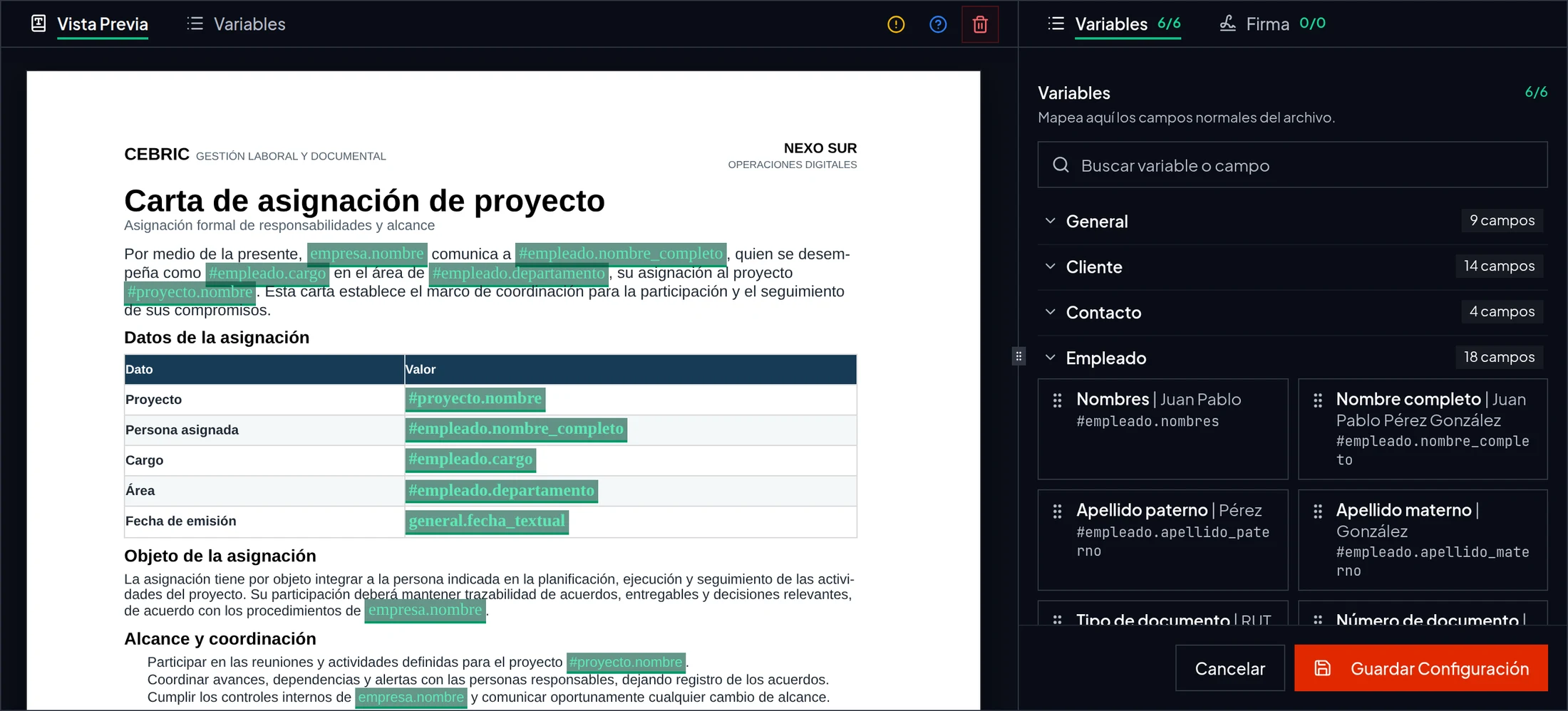
Your Word letter, with the fields that change connected to cebric.
What changes in practice
Word templates with variables for generating documents without copying and pasting data.
- 01Keep the design and format of your current documents.
- 02Reduce errors when copying names, tax IDs, dates and roles.
- 03Generate and send for signature in the same flow.
What is included
- DOCX template upload
- Company, worker and project variables
- Individual and bulk generation
- Final document conversion
- Direct send for signature
- History linked to the relevant record
A simple workflow
From the task to the record, in three steps
- 01
Prepare the template
Keep your Word document and mark the fields that change.
- 02
Choose the records
Select the company, project or workers that provide the data.
- 03
Generate and sign
Review the result and send it for signature without printing or scanning.
Your first task
Start with one document.Or one receipt.
Try the workflow with your own information before moving the rest of your operation.
Browser-based. Internet connection required.
Create your account
Verify your email and set up your company workspace. Explore is a permanent free plan with defined limits.
Prepare one real task
Have a worker document or a receipt photo ready. Start with the process you need today.
Review and complete the task
Check a document and send it for signature, or review the extracted receipt data before submitting an expense.
Common questions
Do I need to change my document design?+
No. Start from your DOCX templates and keep their structure, logos and formatting.
Can I generate documents for several people?+
Yes. Generate individual documents or process several records with the same template.
Can I start without a paid plan?+
Yes. Explore is a permanent free plan with defined limits. It uses the actual product, not a demo that expires after a few days.
Can I use Cebric without internet?+
No. Cebric requires an internet connection. You can take photos with your phone camera and upload them once you are online. Photos do not sync automatically, and upload, AI analysis and signing require a connection.
What do I need to get started?+
Create your account, verify your email and set up your company workspace. Have a worker document or receipt photo ready to complete your first task. Setup time depends on the information and processes you need to configure.
